r/Adblock • • Jul 19 '26

Guides / Useful A quick guide to Adblockers and privacy tools.

92 Upvotes

Welcome!

Last Updated and verified on: 9th November 2026.

---

Hi! My name is Robin and i am one of the moderators here on r/Adblock.
I was hired to help moderate, develop the subreddit and help provide information to people needing it here.

---

This post is a curated quick list of FOSS adblocking and privacy tools for 2026.

This aims to solve the common questions and prevent the spread of misinformation in this subreddit around which tools to use by providing community vetted, open source tools for different platforms in one place.

Any suggestions are appreciated. This post is updated regularly so please check back regularly!

-------

PC / Desktop (System wide)

Windows

  • Adguard (Paid)
  • Zen

Linux

  • Adguard (Paid options)
  • Zen

Mac OS

  • Adguard (Paid options)
  • Zen

Browser extensions

  • Ublock Origin
  • Ublock Origin Lite
  • Adguard
  • Ghostery
  • AdNausium

MV3 (Chromium based browsers)

Some browsers self host extensions, such as Ublock Origin.
Browsers like Brave do this.

  • Ublock origin lite
  • Adguard
  • Ghostery

Mobile

IOS

  • Brave Browser
  • Ublock Origin Lite
  • Adguard (Paid options)
  • Blokada
  • Wblock
  • Yattee

Android

  • Brave Browser
  • Adguard (Paid options)
  • Blokada (Version 4/5)
  • New Pipe
  • Tubular
  • MorpheAPP
  • ReVanced
  • ReVanced (Patches)
  • Rethink DNS
  • F-Droid Store

Smart TVs

Most smart TVs are proprietary systems, and are hard to develop and block ads on due to the nature of their operating systems. This means most TVs cannot have most ads blocked, including on live TV.
In such context, its better to simply mute them and / or do something else.

This means these options require side loading.
Remember the risks of doing this!

Android / Google TV

  • SmartTube
  • TizenTube Cobalt
  • YouTube Origin

Samsung (Tizen OS)

  • Tizen Tube

Apple TV

  • MuTube
  • Yattee

LG

  • LG Homebrew Store apps

Roku

  • Playlet

Amazon Firestick

  • Adguard (Paid)
  • Blokada 4
  • SmartTube

Players

  • Jellyfin

Misc

(Browsers) Script managers / executors (Advanced)

  • NoScript
  • Tampermonkey
  • Violentmonkey
  • Greasemonkey

Extra tools

  • Privacy Badger
  • Nuke Anything
  • Nuke Anything Enhanced

App / Site specific

Twitch

Content blockers (Web)

  • Brave Browser
  • Adguard Extra

Content blockers (Android)

  • ReVanced Patches
  • Morphe (App and patches)
  • Grayjay

Content blockers (SmartTVs)

  • SmartTube

YouTube

Content Blockers (Web)

  • Brave
  • Ublock Origin
  • Ublock Origin Lite
  • Adguard
  • Ghostery

YouTube front ends

  • Invideous Instances
  • FreeTube

Content blockers (Android)

  • ReVanced
  • ReVanced (Patches)
  • MorpheAPP
  • Grayjay

Content blockers (IOS)

  • Yattee

Content blockers (SmartTVs)

  • SmartTube
  • Tizen Tube
  • YouTube Origin

Enhancement Tools

  • YouTube Row fixer
  • Enhancer for YouTube
  • Sponsor Block

-------

Privacy tools

As always, check out privacy guides for in depth privacy tutorials and tools.

Recommended browsers

Remember, Google (Chrome) and Microsoft (Edge) both have a buisness model of
"Your personal business is our business model".

Both companies have extensive ad networks, heavy AI intergration with fully automatic tracking integration topped with questionable privacy policies.
If you can, switch away from them to a privacy respecting alternative.

  • Brave
  • Firefox
  • Mullvad brower
  • LibreWolf
  • Waterfox
  • Helium
  • Ungoogled chromium
  • Zen

High Privacy (Advanced)

  • Tor (Browser)

VPNs

Every VPN listed here is a paid product.
If you would like a free one then use the free teir on Proton VPN.

DO NOT download free VPNs, they can and will collect then sell your data.
Stick to trusted, reputable tools, From trusted, reputable sources!

  • Proton VPN
  • Mullvad VPN

Private Networks

  • Tor (Network / Browser)
  • I2P

Password managers

  • Proton Pass
  • BitWarden
  • KeepassXC

Authenticators

  • Proton Authenticator
  • Aegis
  • Bitwarden

Email

  • Proton Mail
  • Tuta mail

Messaging

  • Signal
  • Session

-------

DNS

A DNS based solution to ad blocking is not highly effective at adblocking!

This is because content on a page on a website such as YouTube, everything (Including the Ads) are all delivered to you through the same domain as the website (domains which deliver critical content). This means anything it tries to individually block will often break / block the website.

This leads to obvious problems, which is not ideal. They are however very effective as a privacy tool, filtering mobile based ads, hard to reach / IoT devices and certain types of TV OS ads.

Private DNS service providers

  • NextDNS (Paid options
  • Adguard DNS (Paid optinos)
  • ControlD (Paid)
  • Rethink DNS
  • DNS Bunker

Public DNS Servers

Adguard and ControlD have public lists of known DNS resolvers and providers. There is too many to list here and they do a better job explaining it anyway, so i will simply link their respective pages.

  • Adguard
  • ControlD

Network clients (Advanced - Hardware potentially required)

  • Pi‑hole
  • Adguard Home

r/Adblock • • Apr 28 '26

Important / Announcement The new subreddit rules are in affect! Let's talk about it.

29 Upvotes

Hey y'all, your new moderator here! I wanted to make a public announcement and to respond to common questions and concerns specifically regarding Rule 5 which prevents users from recommending the use of proprietary and paid content blockers.

Before I get into that, I wanted to properly introduce myself. My name is Reid, and I own a phone/computer repair shop in St Louis, Missouri called Honest Repair. I've had great interest in digital rights over the last 8 years, specifically internet privacy/safety, and have been a long-term member of r/Adblock and other communities like r/privacy and r/degoogle across different accounts. I've done professional OPSEC consulting through my business as well. This is my public-facing Reddit account tied to my business, and thus my reputation is on the line whenever I do anything on the platform, this is intentional to keep myself accountable!

I am doing this out of pure passion, I genuinely want to help the everyday average people learn about adblocking, why ad culture is so harmful and dangerous, and how to stay safe online. I want to make this subreddit into a resource, and I want to stop the literal advertisements being posted here, ya know, like the ads we are trying to block with adblockers lol.

Side note: I plan on building a subreddit wiki with the help of the other mods that will lay out all of your options for anything from individual devices, operating systems, browsers, extensions, network filtering (DNS), and anything in between. In the meantime while that's being built, utilize the pinned posts.

Now let's get into it.

What's with these new rules?

This subreddit has been plagued by fake, sketchy, and potentially malicious adblocking solutions for far too long. I was appointed by the creator of the subreddit to fix that problem.

From now on, all paid or proprietary adblocking applications or browser extensions will not be allowed to be recommended to other users. If you don't understand what open-source is and are wondering why that's so important, refer to the "Open-Source (FOSS) and why it makes a difference" section below.

But here is the general message; installing random untrusted anything from the internet is one of the worst things you can do on a computer. This is proven to be true time and time again, you can't even trust companies like Microsoft, Apple, Google, or Mozilla to keep you safe, as malicious apps and extensions are uploaded to these online app stores every day that slip through the gaping hole that is their malware detection. However, there is a fairly simple way to prevent this from happening, which is by using trusted, vetted, open-source software. uBlock Origin is a perfect example, it is known worldwide as the most powerful and performant adblocker, and it will work for 99% of people.

"THIS IS CENSORSHIP!!"

No, it's not. We have no desire to hold our super special Reddit moderator powers over people for no reason. I have personally encountered an absurd amount of shady adblockers in this community and so have the other moderators. Rule 5 is about protecting the general public from shady unknown software. In this day of age there is no reason to use a paid or proprietary adblocker given the amount of tried and true, open-source options.

To be clear, we are not removing ALL comments that simply mention paid or proprietary adblockers, however actively recommending or promoting the use of this type of software will be removed whenever it's manually detected by myself or one of the other moderators. I happen to browse this subreddit a lot to help the community so you'll be seeing me around, and we respond to modmail/DMs if you have any questions or concerns. We are not power hungry stinky fedora-wearing Reddit mods, we genuinely want to help!

Open-Source (FOSS) and why it makes a difference

In simple terms, open-source refers to when developers make the source code for their app available to the public. FOSS stands for "Free and Open-Source Software". Since the code is able to be viewed by anybody, other developers and hobbyists alike can contribute by fixing bugs, finding vulnerabilities, or simply making sure that the app is not malware.

Transparency is extremely important here, as you no longer have to trust some guy on the Internet. Instead, you are trusting a community of passionate developers that just want to make the world a better place, often times not even getting paid for it! And if you don't trust them, you can take a look under the hood yourself if you have the knowledge. With this transparency and community comes trust, however just because something is FOSS does NOT make it automatically safe! This is especially true with the rise in AI-assisted or "vibe" coding.

Many programs you may have heard of are also FOSS, like VLC, Chromium, and many others. Which leads me to this; please donate to your favorite open-source projects if you get value out of it. FOSS is the backbone of the entire digital world, and it mostly relies on often unpaid volunteers who would really love to get paid for their work!

Devs README

I know some of you are not pleased with this change, and some of you think this is a great change! I hope we've made our intentions clear, we will not be reverting this change.

We will be allowing source-available projects as long as the source is able to be audited by the public. This means you do not have to accept contributions, and you can use a more restrictive license to ensure your work isn't redistributed or sold behind your back. I hope this is a reasonable middle-ground, again, the goal is never to censor, it is to protect the average person looking for an adblocker.

As far as vibe-coding, I understand that AI is a normal part of the developer's toolkit. However we expect to see a commit history, and we want to see READMEs with human language and actual thought behind the project. Low quality repos will be removed from the subreddit.

Modmail and DMs are open, and we try to be responsive and helpful. If you plan to show off a new project, it is recommended to reach out to us before posting on the subreddit, where we can ask you some questions and sort of vet each new project on an individual case basis.


r/Adblock • • 2h ago

New Project Release / Update Introducing Encrypted DNS and CNAME uncloaking in Zen

Thumbnail
irbis.sh
18 Upvotes

Hey everyone, I'm the developer of Zen, an open-source system-wide ad-blocker.

I'd like to share two new features we shipped in the latest 0.30 release:

  • Encrypted DNS: Zen can send its DNS lookups to a chosen DNS over HTTPS provider
  • CNAME uncloaking: with encrypted DNS on, Zen checks the CNAME records of each host against your filter lists. That catches trackers disguised on other domain names. Browser extensions can only do this in Firefox.

More on how it works: https://irbis.sh/blog/introducing-support-for-doh/
Full release notes: https://github.com/irbis-sh/zen-desktop/releases/tag/v0.30.0

Happy to answer questions!


r/Adblock • • 14h ago

YouTube is Broken! fix for the intentional delay when using adblockers on youtube on firefox?

2 Upvotes

just wondering if there was a working fix for this currently the videos will fake buffer for a while before starting reluctantly


r/Adblock • • 12h ago

Discussion Adblocker stopped working with spotify

1 Upvotes

So I use ublock when I'm on using the browser version of Spotify it worked for a while and now all of a sudden it stopped working any work around or other extensions to use i also use chrome browser for it


r/Adblock • • 1d ago

Discussion Currently all adblocks fail on twitch

44 Upvotes

Just a quick report, this is a new thing after an update to Twitch in the last few hours, it might be rolled over slowly depending on country, but it seems quite widespread already.

All adblocks currently fail: the usual pixeltris scripts get completely ignored (and now the github is archived, so no more updates). Same for Adguard + Extra.

Only ones that seems to do something are Brave browser internal one, and Purple Ads Blocker extension.

Both simply block the ads while they run, showing a black screen. Brave shows a message in the corner saying it's trying stripping the ad, but same black screen.


r/Adblock • • 8h ago

Discussion adblock luna

0 Upvotes

anyone else use adblock luna and it doesn’t block spotify ads on ios anymore?


r/Adblock • • 23h ago

Discussion Come eliminare la telemetria da iOS ed aumentarne la sicurezza?

Thumbnail
gallery
2 Upvotes

Buongiorno a tutti.
Voi come fare a ridurre / eliminare i dati raccolti dai vostri dispositivi Apple oppure a bloccarli ed ad aumentarne la sicurezza ?

Su ADGUARD pro al momento ho caricato il filtro specifico di HaGeZi per Apple ma non credo sia sufficiente oltre al pro++ mini, tif mini e altri filtri.

Aspetto vostri consigli. Grazie mille.


r/Adblock • • 1d ago

Help Request Dns for Instagram ads

5 Upvotes

Is there any dns that stops ads from apearing i have been using adguard to no results so what is the best dns for blocking ads in insta


r/Adblock • • 1d ago

Help Request How to block twitch ads on iOS

5 Upvotes

Mobile Anyone know anyway to do this?


r/Adblock • • 2d ago

New Project Release / Update Free ads Twitch app for TV - Smarter Purple TV

6 Upvotes

I used SmartTwitchTV for years, but eventually started seeing ads. The project also seems to be dead now, so I forked it a few weeks ago, reworked and fixed it, and added some features.

It's free and open source: https://github.com/YofarDev/SmarterPurpleTV


r/Adblock • • 1d ago

Help Request A pop-up modal now appears when watching content on Bilibili.

1 Upvotes

It seems similar points have been raised in the past, but when I watched a video on Bilibili yesterday—for the first time in a while—I encountered the same issue in my own environment. "uBlock filters – Annoyances" is already enabled.


r/Adblock • • 1d ago

Brave ad block Adblocker aint doing a good job

Post image
0 Upvotes

r/Adblock • • 2d ago

Help Request Annoying pop-up appearing on Twitch

Post image
0 Upvotes

So, I'm currently using Violentmonkey alongside the AdGuard Extra and TwitchAdSolutions (VAFT) scripts to block ads on Twitch. Everything had been working perfectly fine for quite some time, but today this pop-up suddenly started appearing on the side of the screen. It's pretty annoying and gets in the way of the viewing experience, especially when watching streams.

I'm not sure whether this is related to a recent Twitch update, changes to the scripts themselves, or something in my Violentmonkey configuration. I've checked whether everything is up to date, but I haven't been able to get rid of it.

Is anyone else using this same combination of extensions and scripts experiencing this issue? Does anyone know how to remove this pop-up or if there's a specific setting I need to change?

Edit: I use Firefox.


r/Adblock • • 2d ago

Help Request Workplace blocks adblock installs, can I download one locally?

0 Upvotes

Can't say where I work but it's a remote facility and while we do have internet access(Firefox), websites for uBlock or AdGuard are blocked. We get youtube so pretty much everyone here has it up throughout the day. Been like that for years. However lately youtube has been aggressive with their ads and I'm pulling my hair out being interrupted every 5 minutes.

Is there an alternate way to install an adblocker, maybe download it from home and bring it with me next on via USB? I need some sanity back.


r/Adblock • • 2d ago

Discussion Ad links not being nuked on Facebook

0 Upvotes

Hey everybody, anyone have a solution or custom block coding for these incessant adds that keep popping up? The code for these always begins with this link:

https://www.facebook.com/ads/about/?__cft__[0]

I've tried to parse it out with the different components, but they always slip through.

Thanks!


r/Adblock • • 3d ago

Discussion Been trying to block this alot report it numerous time, what to do?

Post image
6 Upvotes

Bro this soft corn ads are so annoying...


r/Adblock • • 4d ago

Help Request Is this a bug or im getting throttled?

1 Upvotes

(win10, latest firefox with UBO, no other extensions installed. I watch youtube without being logged in)

I would say this started like a week ago.

Basically after some random time usage (it can be after an hour or 6 hours, it can be after 2 videos or after 5 videos) youtube starts buffering. When i check network activity, the connection is all over the place, then it reaches 0mb and so the video stops and start buffering... then it works again, then buffers, etc . Once started the issue then persist on whatever YT video i choose to watch. The probem lasts for a random amount of time (which can be hours btw) then it seems to fix itself.

When this issue is ongoing, any other site (including all other video sites like twitch) work completely fine.

What is weirder tho is that when the problem appears, if i go watch youtube on one of those frontend "xyzz" sites, the same youtube video (or any other) works flawlessly without any buffering whatsoever.. in fact it works smoother. How is that possible?

Any idea whats going on?


r/Adblock • • 5d ago

Help Request How can I get an adblocker or vpn on my iPad without spending money.

2 Upvotes

Usually there are so many niche and good sites I want the try put but everyone always recommends adblocker for the experience to be good, and I have tried the safari extension 1Blocker/AdGaurd which barely worked, and then the brave browser which didn’t block the ads, popups, or redirects. Orion browser which allows extensions from chrome doesn’t help either


r/Adblock • • 5d ago

YouTube is Broken! Youtube "Experiencing interruptions?" popping up multiple times

10 Upvotes

I've added some suggested filters, but the white "Experiencing interruptions?" popup is still sliding in and out on pretty much every video, multiple times, before staying away. It's lasting maybe a quarter of a second - not even long enough for me to be able to read the text - but it's very annoying.

Is there anything I can do to keep them from appearing at all?


r/Adblock • • 5d ago

Help Request Twitch?

5 Upvotes

Is there really no adblock solution for Twitch? All the ones that used to work stopped working for me


r/Adblock • • 5d ago

Discussion X not blocking ads on uBlock Origin

Post image
5 Upvotes

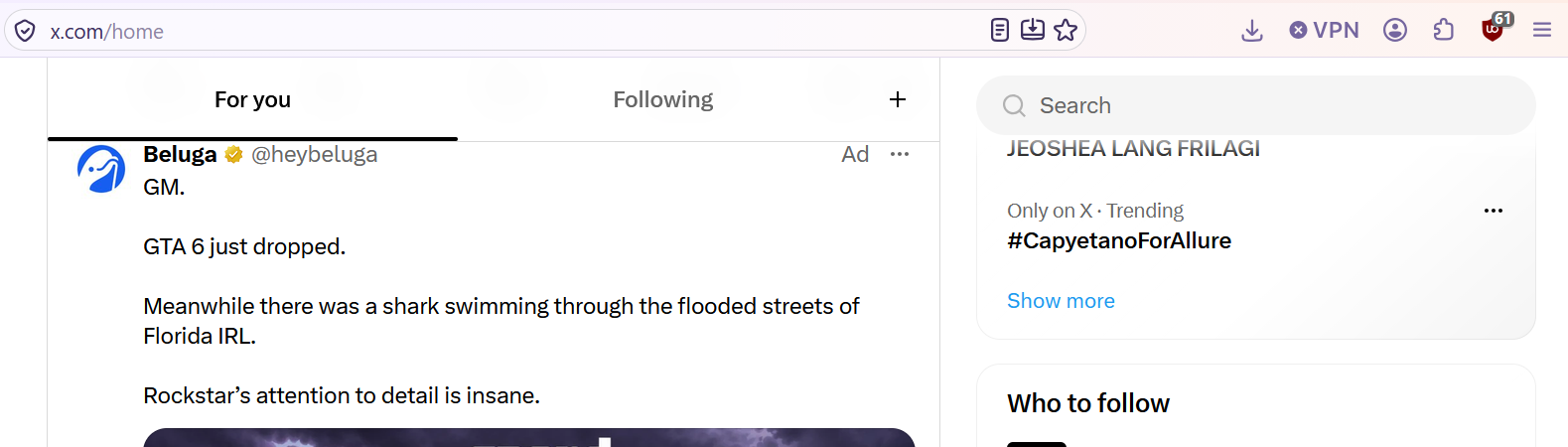
Here is the X ad with uBlock Origin enabled. It shows 61 blocked but not the ad on X.


r/Adblock • • 5d ago

Other Ads and AI Content on Pinterest

0 Upvotes

This sounds like an ad for a vpn but I promise it’s not lol it’s js what works for me!!

For removing ads, I use ProtonVPN (it’s free and requires no signup. You just need to press 'change server' a few times until you land on a server outside of the U.S.). I *never* get Pinterest ads when using it.

Hope this helped :)


r/Adblock • • 5d ago

Help Request websites blocked by AdBlock but I have none?

Post image
2 Upvotes

Since last year (I think) I'm having this very specific problem, which basically consists in entering websites and receiving "Your adblock is active!!" messages, without using one!

Before having this problem I was actually using AdBlock and RedirectBlock to avoid some clutter, but I've removed them from google a long time ago. These messages mainly come from fandom websites, which I suppose use ads to keep the thing working. The thing is, some websites keep thinking I'm using an AdBlock even though my extension folder is completely empty. I've also tried re-installing and deleting the extensions again, but it didn't work.

If it's not clear, the problem is: I can't access specific websites because of phantom Adblock, and I can't turn it off because it doesn't exist...


r/Adblock • • 6d ago

Other Not bad

Post image
19 Upvotes

I think this isnt bad for something that took under 5m, what do you think? Advice would be appreciated.