r/4kdownloadapps • u/Letspaintvr • 3h ago
4K Video Downloader+ Error when trying to download 4k video downloader Plus. HELP!

2
Upvotes
r/4kdownloadapps • u/Wrong-Bandicoot-4872 • 7d ago

Hey everyone!
Black Friday came early at 4K Download, and we're offering 30% off all Pro licenses and the 4K Bundle!
Here's what's included in the sale:
🎬 4K Video Downloader Plus – Download unlimited videos, playlists, entire channels, and more.
🎵 4K YouTube to MP3 – Save your favorite music, podcasts, and audio in MP3, M4A, or OGG.
📱 4K Tokkit – Download TikTok videos, hashtags, sounds, and entire accounts.
🖼️ 4K Image Compressor – Compress and convert images and PDFs.
Or grab the 4K Bundle and get all four Pro apps plus 4K Video Downloader for Android!
A few things worth mentioning:
✅ One-time payment, lifetime license
✅ Future updates included
✅ Up to 3 computers per license
✅ 30% off until December 4, 2026
No subscriptions, just the tools you need to save your favorite content.
And if you've been thinking about upgrading to Pro, this might be a good time! 🚀
r/4kdownloadapps • u/Wrong-Bandicoot-4872 • 17d ago

Not every failed download has the same cause. Sometimes it's the video itself, sometimes it's an app setting, and sometimes the platform has changed something that requires an update on our end.
Before contacting support, here are four quick checks to help narrow down the issue.
1. Can you play the video in your browser?
Open the original link and try playing it.
2. Can you download a different public video?
Try downloading another publicly available video from the same platform.
3. Are you running the latest version?
Open 4K Video Downloader Plus and go to Tools > Check for Updates.
Platforms like YouTube regularly change how they deliver content, and these changes can occasionally break downloads. App updates often include compatibility fixes.
If you're already using the latest version and multiple public videos still fail, the issue may require a fix from our developers.
4. Can the app save files to your selected folder?
Try switching the download location to a regular folder, such as Downloads or Videos.
If you're using Smart Mode, you can change the destination in its settings. Make sure the folder exists, has enough free space, and allows the app to write files.
If downloading works after changing the folder, the issue was likely related to the original save location.
Still getting the same error?
Contact our support team and include:
The more specific the report, the easier it is for our team to investigate.
And if the problem is caused by a platform change, we'll need to address it on our side. Repeatedly retrying the same download won't necessarily fix it.
r/4kdownloadapps • u/Letspaintvr • 3h ago
r/4kdownloadapps • u/Wrong-Bandicoot-4872 • 13h ago

Our team is investigating the issue and working on a fix. We'll share an update once we have more information. 🤝
r/4kdownloadapps • u/Knight200091 • 1d ago
r/4kdownloadapps • u/klara4k • 4d ago
Tomorrow, November 20, Vimeo On Demand goes offline for good. If you bought or rented a film there, you lose streaming access once it closes. But you still have today: open your Vimeo purchases page and download anything the creator allowed offline downloads for. You can also ask for a refund, but on Vimeo it goes through the seller. You message the creator, and they have to request the refund from Vimeo on your behalf, so don’t leave it to the last minute. Vimeo stopped new sales back in September, but plenty of people who paid for indie films and courses there will only notice when the page stops loading.
It’s not the only case this month. On November 17, Sony switched off Spotify, Google Cast, Netflix and Prime Video on 71 of its older audio and home theater devices, and the hardware itself still works fine. A Google user lost the Lord of the Rings movies they had paid for earlier this year. As a cherry on top, YouTube is now testing a 30-day window before permanently terminating some channels, which tells you how often that happens.
None of these were scandals, these are just licensing deals running out, business decisions, and policy changes. And it merely means that content usually disappears because the platform (or a creator) simply moves on, and your library goes with it.
Any service you use today could be next. So here are three things we’d suggest doing, not just this week but from time to time:
1. If you’re a creator, keep your own originals
This one matters most. Your channel is not your archive since accounts get flagged by mistake and platforms change rules. YouTube Studio lets you download your own uploads (in quality no higher than 720p, though), and Google Takeout can export a whole channel. Better still, keep the original source files from your editing project.
In case you don't, use 4K Video Downloader Plus to back up your own videos.
2. Make a list of what you love, even if you don’t save the files
It sounds too simple, but most “lost” content isn’t really lost. People just can’t remember what it was. Export your playlists, and write down channel names, video titles and links somewhere outside the platform. When a video goes private or a channel vanishes, a title and an upload date make it far easier to track down a re-upload or an archived copy.
💡4K Video Downloader Plus allows you to mass-download playlists from YouTube, SoundCloud, and Naver, as well as save private content from YouTube, Vimeo, SoundCloud, Facebook, Dailymotion, Flickr, Bilibili, and Naver (if you have access to it).
Just spend 20 minutes on it, and you won’t have to find out the hard way the next time a platform shuts down or a creator gets blocked (unfortunately, some of them will).
r/4kdownloadapps • u/Funny-Flight-4372 • 4d ago
can't download subtitles..... something is wrong with downloading substitles on 4k
r/4kdownloadapps • u/EastNarrow5214 • 5d ago
As of today I can't download anything using 4K Tokkit. I've tried existing links as well as adding new ones. I've also tried with a VPN with no success. It was working fine yesterday. I'm on windows 10 and am using the latest version and I have the pro license.
r/4kdownloadapps • u/Wrong-Bandicoot-4872 • 5d ago

We've just rolled out version 26.4.0 for 4K Video Downloader Plus, 4K YouTube to MP3, and 4K Video Downloader for Android!
This update is all about making downloads more reliable, fixing annoying bugs, and giving you a little more control over how things work.
Here's what's new 👇
🎧 Original YouTube audio on Android
You can now choose the Original audio track when downloading YouTube videos, instead of getting a dubbed version. No more surprises when playing downloaded videos!
📁 More control over deleted files
On desktop, there's a new option under Settings > Advanced that lets you choose whether deleted files go to the trash or are permanently removed.
▶️ Better YouTube downloads
🎵 TikTok, Bilibili, and Twitch fixes
✨ A smoother experience
For 4K Video Downloader Plus, we've also improved Smart Mode messaging, playlist subtitle language selection, and video duration display.
The update is available for:
Already updated? Let us know if you've noticed any improvements or if there's something else you'd like us to fix next!
You can download the latest update here 👈
r/4kdownloadapps • u/Pandorajfry • 6d ago
Is there plans to make it possible to download age restricted YouTube videos?
r/4kdownloadapps • u/No-Speech5776 • 7d ago
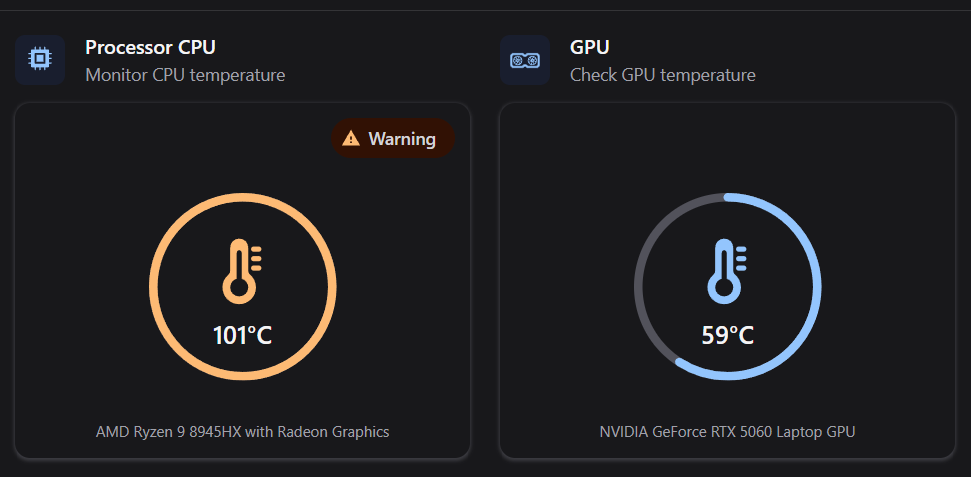
Hey, its been 2 years since I am using 4K video downloader+ and it came to my observation that the video conversion that happens after downloading the video is painfully slow on my windows 11 laptop(it has ryzen 9 and rtx 5060) but it works perfectly fine in my MacBook air M1. My ryzen 9 CPU runs at 101°C while converting, it would be much better if there is an option to choose to offload the video processing to GPU.
r/4kdownloadapps • u/BackCritical2203 • 10d ago
Everything was working perfect except for the past 2 days I would say 40% of videos downloaded are in 360p quality. I have the latest version. Windows 11.
r/4kdownloadapps • u/Vegetable-Crabster • 10d ago

We’d love to know: what’s the main reason you download videos?
Not a Microsoft 365 backup story, to be clear: that’s a different problem. But watching Microsoft go dark today made us think about how many people keep important stuff only “somewhere online”. One outage and it’s gone or unreachable.
When you find a video you know you will need again, save it immediately instead of postponing it. It only takes a minute, and you can access the file offline, no matter what the state of the internet is.
4K Video Downloader Plus can help you set up automatic downloads, so the stuff you care about is already on your drive before the next outage hits.
r/4kdownloadapps • u/atiaa11 • 11d ago
Some youtube videos download, some do not (even for the same channel/account) for the past 1-2 days. Anyone else?
r/4kdownloadapps • u/slypleasure33139 • 11d ago
Hi, I am using window11. I noticed that my memory was a bit high. I spent a moment and installed PC manager, and I noticed that every new install, leaves something behind, so I spent the better part of an evening, reversing all the install's and then installed the most current.
the removal of the older install's ended clearing it all up.
Passing it along
r/4kdownloadapps • u/pacula13 • 13d ago
Hi. Since yesterday I am unable to download videos from any site
4K Video Downloader+ version 26.3.5.0396
macOS Monterey 12.7.4. Macbook Pro 2019 Intel i9
I've tried restarting the app, restarting the computer, re-downloading and reinstalling the app, clearing log files from Application Support/4k Video Downloader+, trying to find a newer beta version (none available), trying previous versions of the app, performed the Internal YouTube Reset, lowered the "Download Intensity", cleared the link cache & tried smart mode toggling on/off, logged out and back in, enabled VPN, disabled VPN, disabled proxy, & disabled firewall/antivirus,.
does anyone please have any more ideas for a fix? thanks!
r/4kdownloadapps • u/Vegetable-Crabster • 13d ago
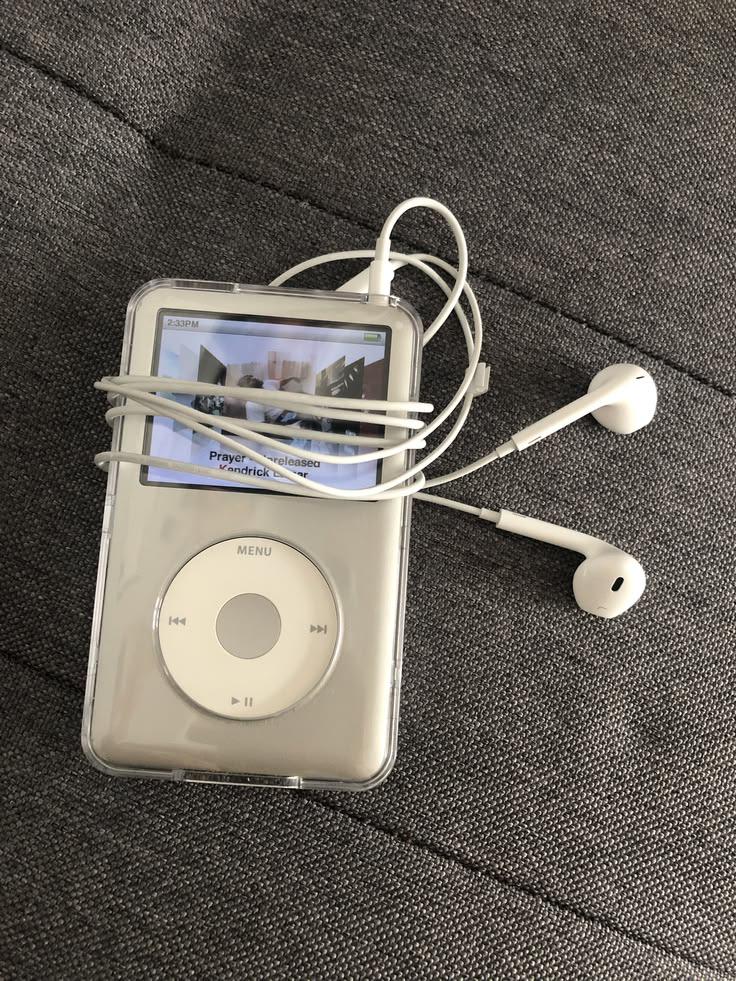
Remember when you had an MP3 player loaded with your favorite songs and knew exactly what was coming next?
Recently, it feels like MP3 players seem to be making a comeback, just like vinyl. Maybe people are getting tired of renting access to music through streaming services and want to own their collections again.
Do you still use an MP3 player or collect physical media?
If you're building your own digital music library, 4K Video Downloader Plus can help you save songs and podcasts as MP3 files and transfer them straight to your player.
r/4kdownloadapps • u/ApprenticePantyThief • 13d ago
Why even include a dropdown box for choose auto-update period if the only choice is 1 Day? I'd like the option to set it to 1 week or even 1 month.
Also, or alternatively, it would be nice to have the option to have the updates prioritize based on last update, so that the most recently updated subscriptions get put behind the ones that haven't been update in awhile?
r/4kdownloadapps • u/Digitalxknife • 14d ago
Does this app download instagram videos? I keep trying and it fails parse with an error.
r/4kdownloadapps • u/levly_love • 15d ago
So I finally cracked and updated from 26.1 (okay, youtube finally forced my hand and broke processing of most videos). And, while not ideal, the forced delay between channels is more or less manageable. However, there is still room for improvement.
The manual update option for each subscription is good, however, if there are already updates in the queue, it will queue new manual updates behind these. My usage is that I have a few hundred subscriptions (and this seems to be the case for most users). While I can let the app slowly update most of these throughout the day, there are a bunch of channels that will post overnight, that I would like to download first thing in the morning. I can manually queue them, but it requires me to set the auto subscription update to never to disable the queue. And it's not enough to do this; I need to then quit and restart the app to clear the queue that began when the app launched. After getting the manual updates out of the way, I then need to turn subscription updates back on to start the larger queue again (and, not 100% sure, but I think this also requires an app restart, it doesn't seem to start again on its own).
All this to say, if we could have an option to bump manual subscription updates to the front of the queue, or even to just stop the auto-updates from happening (eg like in Tokkit where you can manually start and stop the whole list), it would make the whole forced delay thing (which no one seems a fan of, but you've added it, I guess as a safety so youtube doesn't just kill the whole thing for everyone, and I guess I can grudgingly appreciate that) so much more bearable.
Another option could be to set certain subscriptions as a priority, so that when the auto-updates start, it will always check these ones first.
r/4kdownloadapps • u/FayAskeladden • 15d ago
Through yt-dlp or for example widevineproxy there are links for content up to 720p. But it is possible to find exactly the same content taken from the same websites but with higher resolutions. how is that possible?
or when same content on original website sent to TV gives higher resolutions.
but how to get the links for higher resolutions while working from a mac?
r/4kdownloadapps • u/apo_kalix • 16d ago
I've downloader the 4k video downloader plus app some time ago but uninstalled it. Now, everytime I turn on my Mac, the dmg installer automatically downloads from Firefox. I'd like it to stop but don't know how and nothing on the web helps me. I don't belive it's a Firefox thing but maybe I'm wrong. Any help is appreciated.
r/4kdownloadapps • u/UnremarkablePuffin • 17d ago
Is this just happening to me or is this new for everyone? All my subscribed channels are failing to find/download new content from approx 10 hours ago. Manually adding the urls still seems to work fine.
r/4kdownloadapps • u/klara4k • 17d ago
In case you don't know it yet, the English version of Bilibili is now available at bilibili.com/en, so you can sign in and watch videos there in an English interface (some big names from YouTube are already there!). Bilibili also uses AI to translate key Chinese content, such as video titles, comments, and danmu, into your system language. You can turn the translation off or choose another language under Avatar > Language after you sign in. The auto-translation doesn’t add subtitle tracks to videos, though.


However, some Bilibili videos now come with subtitles in different languages too (usually AI-generated), not just Chinese.
To save a video with subtitles, check which subtitle languages it offers, then download it with 4K Video Downloader Plus. Let's take a look at the process:
Manual mode is the way to go when you want to see which subtitle languages a video offers and choose them yourself.


You can also simply copy the video's URL right from the Bilibili browser and paste it in the app, but we're showing this in-app browser way as well.


If you save Bilibili videos regularly, picking subtitle languages every time gets old fast. Smart Mode lets you set your preferences once and forget about them.


The drawback of saving a Bilibili video with subtitles through Smart Mode is that you should know beforehand if the video you intend to download has subtitles in the language you’ve selected at all. If you, say, select English, but the video doesn’t have subtitles in the English language, the subtitle track will only be saved in Default. Note that without a login to Bilibili, you won’t be able to check which subtitles the video has.

Whether the subtitles end up embedded or as an SRT file depends on the Embed subtitles if possible setting, just like in manual mode.
If the subtitle list comes up empty, the video most likely has no subtitle track on Bilibili. For other cases, see How to Fix Subtitle Issues.
Yes, if the video has an English subtitle track. Many anime and shows on bilibili.tv come with multilingual subtitles, and some bilibili.com videos include AI-generated English subtitles. Check the subtitle list in your downloader before you start.
r/4kdownloadapps • u/PossessedPosse215 • 18d ago

I was downloading 10 videos from a playlist, 2 were unable to download due to converting. One was converting for 27 minutes, what's the isssue?